Free OmniFocus for Mac from Now Till End of Jan 2013

OmniFocus for Mac is now free at Omni’s website till end of January, right when the OmniFocus 2 will debut. This is extracted from the recent post on the Omni Blog,
“I also want to make sure everyone understands that the OmniFocus 2 debut on January 31st is not when OmniFocus 2 will be shipping! That’s just the first time the app will be shown in public. Following the debut, we’re planning a limited private test period (which you can sign up for), followed by a wide open public test—and then (finally!) when we’ve evaluated everyone’s testing feedback and think it’s ready, we’ll ship the app. If this sounds like it might take a while… yes, it probably will!
So, if you’re looking to purchase OmniFocus today, what should you do? Should you wait for OmniFocus 2?
Well, first of all, there’s no reason to wait on purchasing the iPad and iPhone apps—as I’ve noted above, they’re not the editions which are getting a major upgrade this year.
But if you’re looking at purchasing the Mac app, it would be quite reasonable to wait until after the OmniFocus 2 debut so you know what’s coming before you make a decision. To make that wait easier for everyone, we’ve decided to post a temporary license key so you can all use the app between now and then without having to make a purchase:
License Owner: Waiting for OmniFocus 2
License Key: KXKN-ZJDB-EJCX-LZHW-CFBF-QFC
(Just copy and paste both the License Owner and License Key into the appropriate fields.)
I hope you’re all looking forward to OmniFocus 2 as much as I am! And that this temporary license key makes the wait a little easier.”
Source – Omni
Apple Product 2013 Pipeline
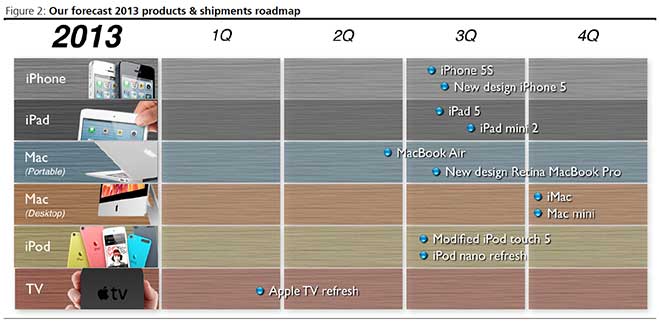
Hmm….let me count….two iPhones, one iPad, one iPad Miniall in 3rd quarter, iOS devices will be a very crowded quarter, save up your money if you’re planning on upgrading.
Source – KGI Securities via Apple Insider
iPhone 6 Concept Video
Source – Redmond Pie
Now You Can Upload Your iPhone/iPod Touch Movies to YouTube Via Capture App
Only available for iPhone and iPod Touch via the App Store for the time being, Android version coming soon.
Source – YouTube
Most Expensive Apple Store Opens in Hong Kong
Apple opened its third Apple Store at Hysan Place, Causeway Bay, Hong Kong yesterday.
Hong Kong Apple Store Grand Opening @ Causeway Bay, Hysan Place from M.I.C. Gadget on Vimeo.
Twitter Launched Long Awaited Retro Photo Filters For Mobile Apps
This from the Twitter blog:
Every day, millions of people come to Twitter to connect with the things they care about and find out what’s happening around the world. As one of the most compelling forms of self-expression, photos have long been an important part of these experiences.
Starting today, you’ll be able to edit and refine your photos, right from Twitter. The latest versions of Twitter for iPhone and Twitter for Android introduce a few new ways to enhance the images you tweet. We’re grateful to our partner, Aviary, for powering our filters and effects.
Filters. Apply one of eight filters, ranging from black & white to vintage, to add a new look and feel to your photos.
Take a bird’s-eye view. See how each filter would affect your photo in a single grid view, or swipe through looks to compare your options.
Frame the action. Crop and pinch to zoom in order to focus attention.
Auto-enhance. Make your photos pop with balanced light and colors by tapping the wand.
In June, 2011, we introduced the ability to attach a photo to your Tweet, a first step toward improving the entire photo experience on Twitter. Since then we’ve been making it easier and faster to share and discover and enjoy great photos on Twitter every day:
- You can expand Tweets to view photos from various photo services right on Twitter;
- You can preview photos directly in Discover and search;
- You can quickly swipe through images on Twitter with photo streams in profiles and search results.
Source – Twitter
NBC Rock Center Video Interview with Tim Cook
These two videos are screen capture, if you want to see the high quality vid, hop over to NBC’s website.
Source – jkhan via 9to5Mac
Apple iTunes 11 Launching Today?

Image from Cult of Mac
Rumours on the street says that there is a good chance that Apple is launching the new iTunes 11 today, this according to Wall Street Journal. So guys, check your Macs for updates, if any.
Source – Wall Street Journal
New 21-inch iMac Available 30 November, 27-inch to Ship in December

According to TNW (The Next Web), Apple announced today that the 21-inch iMac will be available starting 30 November 2012 and the 27-inch will be ready to ship some time in December, still no fixed date yet. The new iMac will offer the option of a Fusion Drive, a hybrid of a SSD together with a normal hard drive, this and the much thinner form factor is the selling point of this 8th generation of iMac.
Let’s hope the 27-inch iMac will be ready to ship before Christmas as my three year old 27-inch iMac is long dued for retirement.
Source – TNW

A New Way To Surf The Net on Your iPad – The Rockmelt Way

When it comes to reading newsfeed on the iPad, the Flipboard and Zite are my two favorites, but for the past couple weeks, Rockmelt for iPad is gaining my affection because of two unique factors. First off, one start off with Rockmelt by logging into their Facebook or Twitter account and Rockmelt will learn what you are interested in from what you click or share. The second key factor is that unlike Flipboard and Zite, Rockmelt has a search bar built in and that can add your personal preferences to the whole learning process as well.
You can get the app from the iTunes Store here. Reviews fro the app so far been great, test drive yours today.
Source – Rockmelt for iPad
Sid Meier’s Railroads For Mac Is Here
 For those readers who’s pretty much as old as I am, I’m sure you remember Sid Meier’s Railroad Tycoon back in 1990. The latest edition, Sid Meier’s Railroads (US$30) is a business simulation game developed by Sid Meier on the Gamebryo game engine that was released in October 2006 and is the sequel to Railroad Tycoon 3 according to Wiki and is now on the Mac. It’s not on the App Store yet but you can get it at Feral Interactive’s website, link here. Check out the trailer below.
Source: Feral Interactive
Recent Comments
Feed Me!!!


Badges – Misc

This work is licenced under a Creative Commons Licence.


My blog is worth $32,743.32.
How much is your blog worth?

 Hong Kong Tech Phooey